

Podcasting with a co-host or numerous guests in a studio setting is a great means of engaging people and getting them interested in a specific topic.
While this is the best means of podcasting, it also comes with many technical challenges. Thus, you should carefully read this article in order to ascertain how to record a podcast using numerous mics (also see, ‘Best Podcast Microphones‘).
|
Professional Quality

|
Most Versatile

|
Content Creators

|
|
Primary Rating:
4.7
|
Primary Rating:
4.6
|
Primary Rating:
4.5
|
|
$169.00
|
$99.99
|
$95.03
|

What Are The Best Options For Recording Over 2 People?
If you want to record a podcast episode with yourself and a co-host, then you will need to implement numerous setups using multiple microphones.
For the sake of ease, we have narrowed your choices down to those that require the minimum amount of audio monitoring. This will ensure that you can record on numerous tracks.
You will need to test each mic prior to starting your sessions, and ensure that you have the appropriate amount of distance between each microphone (also see, ‘Why Is My Mic Not Working‘).
Using quality microphones from the same brand is a great means of ensuring that you record high quality audio and maintain audio consistency throughout your podcast.
If you are strapped for cash and want to record with up to eight people, then you should implement the following steps:
1) Use A Digital Recorder
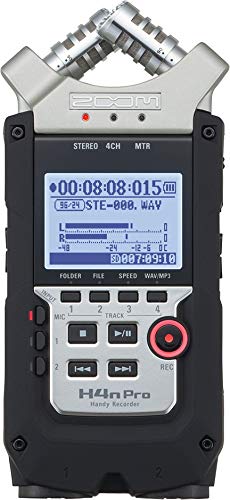
A digital recorder or audio mixer can be purchased in order to allow you to plug in numerous XLR microphones and record individual tracks.
This setup is perfect for recording at home or in a studio as it is highly versatile.
For instance, you can visit a specific location in order to record the highest quality audio without the need for copious amounts of equipment.
Digital recorders like Zoom H6 and PodTrack P4 include an XLR microphone input that allows you to record on different tracks (also see, ‘USB Mic vs XLR‘).
| Product Image | Product Name / Primary Rating / Price | Primary Button |
|---|---|---|
|
|
|
|
|
|
|
|
|
|
||
|
|
|


